Response API in File Processing
Automate file processing workflows with intelligent chatbot integration
Why is the Response API Used in File Processing?
The traditional file processing feature requires manual file selection and is not compatible with AI Mass Processing. The Response API for file processing provides several key advantages:
Current Limitations
- Manual File Selection: Users must manually select preferred files
- No AI Mass Processing Support: Cannot be used for bulk operations
- Limited Automation: Requires manual intervention for each file
Response API Benefits
- Automatic File Specification: Uses Data Context Mapping to automatically specify preferred files
- Chatbot Integration: Provides an additional chat icon in the GPTfy console for file-related conversations
- AI Mass Processing Support: Enables file processing in bulk operations
- Reduced Manual Work: Significantly reduces time and effort required
How to Use Response API in File Processing
Step 1: Create a Prompt
- Create a prompt of Text or JSON type
- Check the Include File checkbox
- Set AI Model-File Processing field to Response API
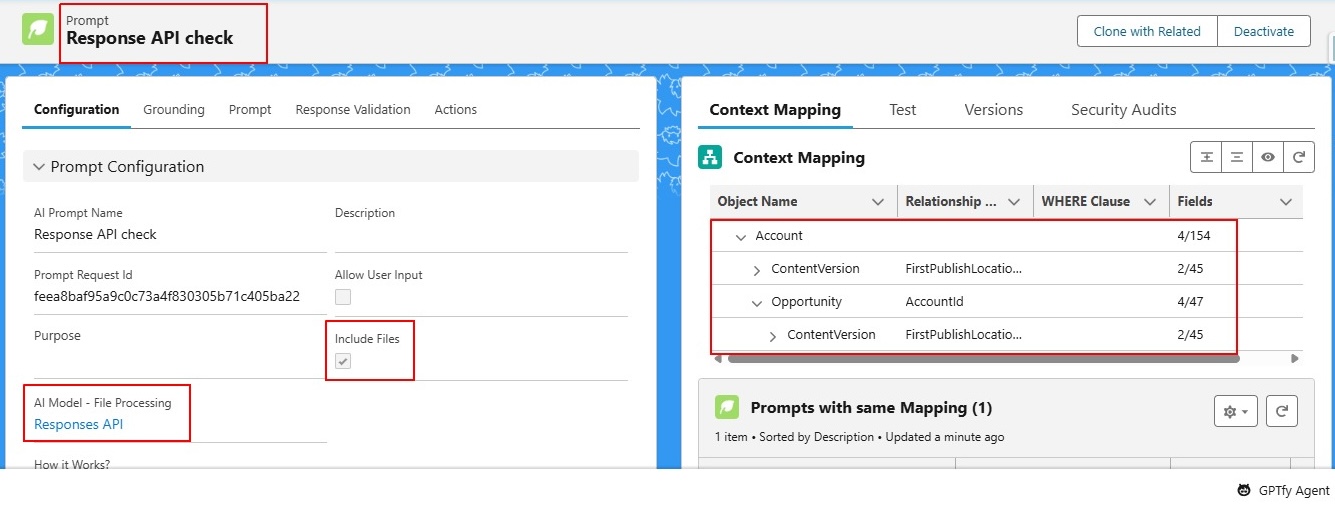
Step 2: Configure Data Context Mapping
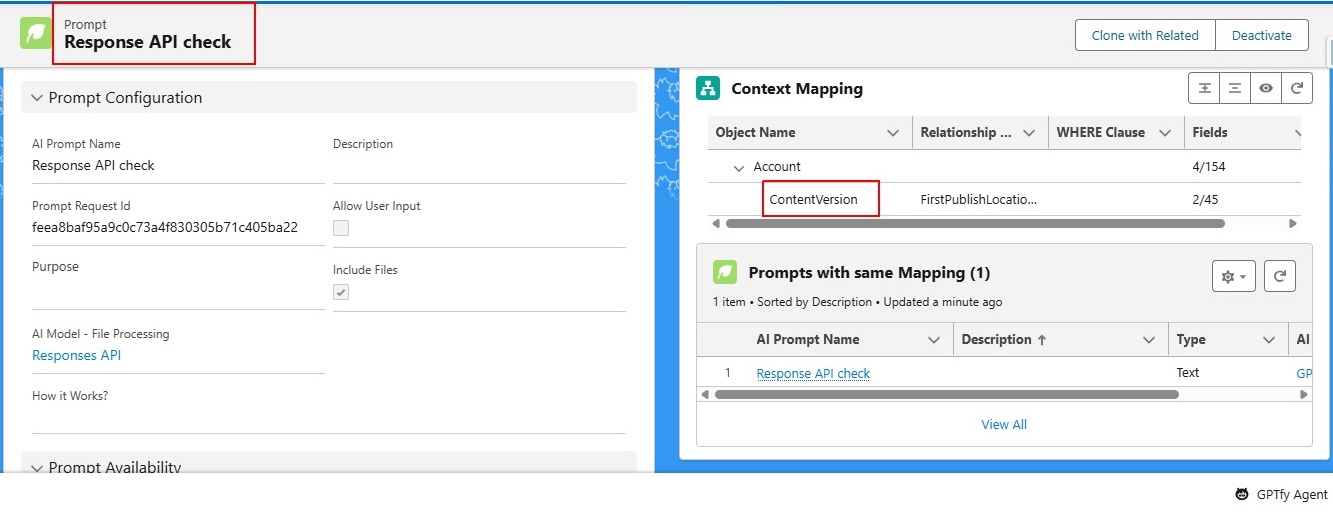
- Add Content Version as a related object to your target object
- Example:
Account → Content Version,Opportunity → Content Version
- Example:
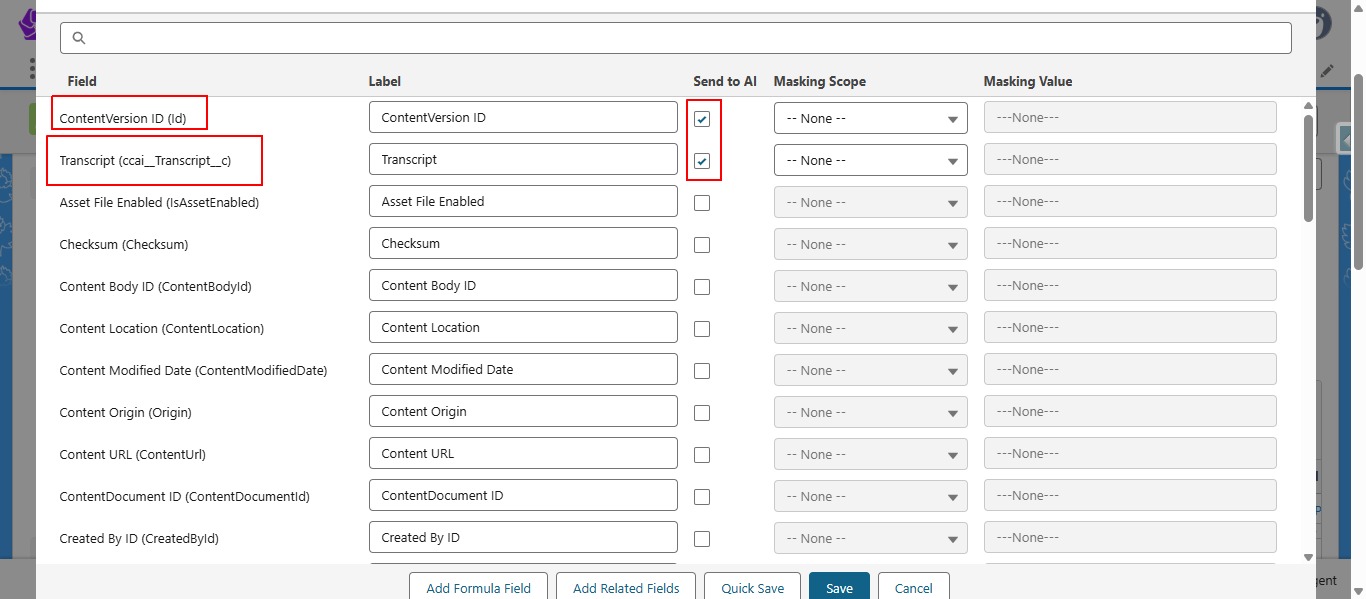
- Open the mapping for the Content Version object
- Add the Content Version ID field
- Optionally provide a Where Clause for specific file filtering
Step 3: Configure and Activate Prompt
- Provide the Prompt Command or Prompt Component as needed
- Activate the prompt
Step 4: Execute File Processing
- Run the prompt in either:
- Test Console (Test tab)
- GPTfy Console (on the desired object's record)
- Do not select any file manually - the system will automatically process files based on your mapping configuration
Step 5: Interact with Results
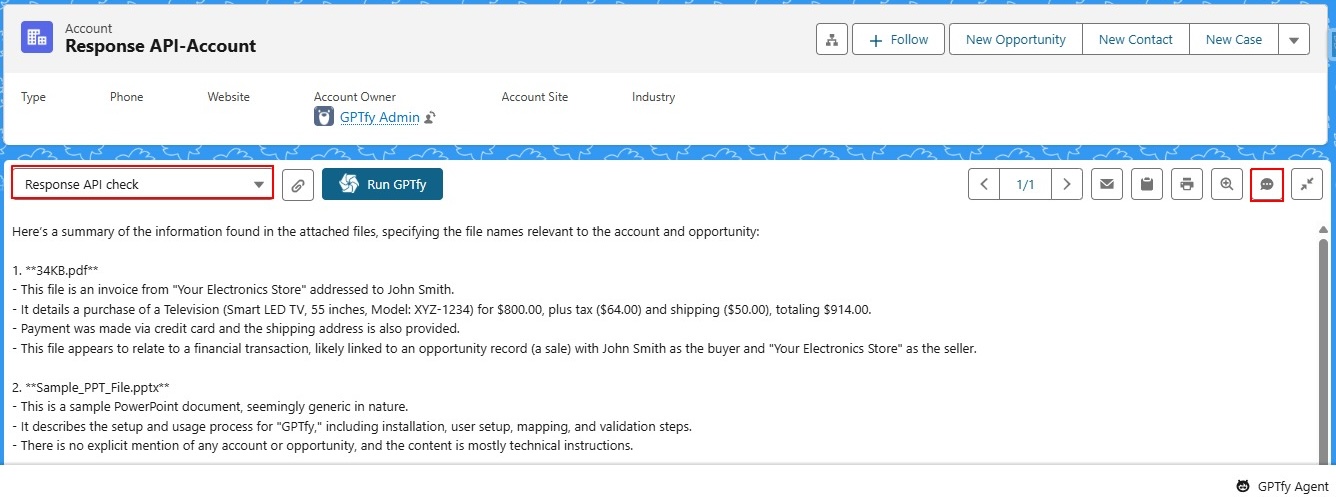
- Receive the response based on your prompt command/component
- For additional file information, use the Chat icon in the console
- Chat with the agent to get detailed information about the file contents
Key Features
Automatic File Processing
- Files are automatically selected based on Data Context Mapping
- No manual file selection required
- Supports bulk processing through AI Mass Processing
Chatbot Integration
- Chat Icon: Available only when AI Model-File Processing is set to Response API
- Conversational Interface: Ask questions about file contents
- Contextual Responses: Get detailed information about processed files
AI Mass Processing Support
- Process large numbers of files automatically
- Generate reports based on file contents
- Reduce manual work and time consumption
Use Cases
Document Analysis
- Automatically analyze attached documents for specific objects
- Extract key information from files without manual selection
- Generate summaries or reports based on file contents
Bulk File Processing
- Process multiple files across different records
- Create comprehensive reports from file data
- Automate document review workflows
Conversational File Queries
- Ask questions about file contents through the chat interface
- Get detailed insights about processed documents
- Interact with file data in a natural language format
Important Notes
- The Chat Icon is only available when AI Model-File Processing is set to Response API
- This feature works in both Test Console and GPTfy Console
- Files are automatically processed based on your Data Context Mapping configuration
- No manual file selection is required during execution
Benefits
- Automated Workflow: Eliminates manual file selection processes
- Scalable Processing: Supports AI Mass Processing for bulk operations
- Enhanced User Experience: Provides conversational interface for file interactions
- Time Efficiency: Reduces manual work and processing time
- Flexible Configuration: Supports various file types and filtering options